The P&ID set
A P&ID set from the spec, issued for review, in your CAD.
From one generation: a legend, a PFD with its stream table, one P&ID per system with control loops, safety devices, and numbered lines, a utilities sheet, and the lists that go with them. Drawn by the rules, cited on every line, exported as PDF, DXF, and DEXPI.
Every sheet is issued for review and watermarked preliminary, with checked-by and approved-by blank. Your engineer of record checks and seals from the DXF in your own CAD. PadSpec never represents a drawing as issued for construction.
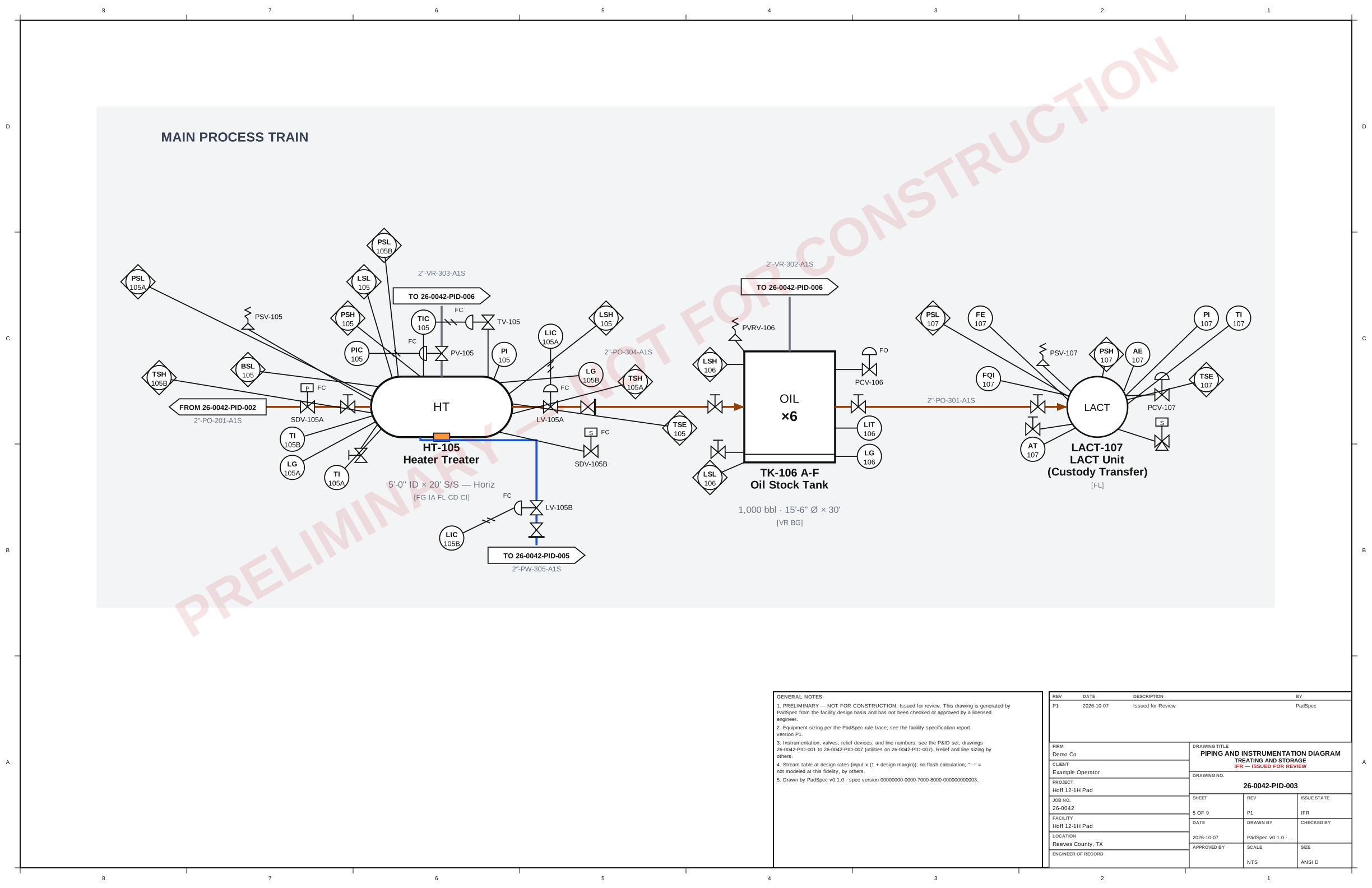
Real engine output from the Permian worked example: sheet 26-0042-PID-003 as issued, with the frame, general notes, revision block, and title block.
What is in the set
Nine sheets and four lists, from one spec version.
Legend and general notes
The drawing index, every symbol the set uses, the line-number convention, and the notes that govern reading the set. Nothing appears on a sheet that the legend does not declare.
Process flow diagram
Major equipment with tags and key data, every major stream numbered, and the heat and material balance as a stream table on the sheet or on its own when it does not fit.
One P&ID per system
Wells and manifold, separation, treating and storage, gas handling, water handling, vapor recovery and relief: each with its control loops, safety devices, numbered lines, and off-sheet connectors to the drawing it continues on.
Utilities
Fuel gas, instrument air, the flare and vent header, drains and sump, chemical injection, and blanket gas, drawn and tied in with their own line numbers.
The companion lists
Instrument index, SAFE chart, PSV list, and line list, derived from the same model as the sheets and printed in the facility report so nothing on a list disagrees with a drawing.
Document control
An ANSI D frame with title block, drawing number, revision block, and issue state on every sheet. Revisions track the spec version; a reissue is a new revision, never an edit to an old one.
How it is drawn
Rules put every device, loop, and line on the sheet.
The same rule engine that selects and sizes the equipment carries the P&ID content: ISA-5.1 for instruments, ISO 10628 shapes where they exist and a legend-defined oilfield extension where they do not, API RP 14C logic for protection. Each placement cites its rule in the trace.
Control scheme by rule
Each equipment type carries its loops: level control and dump valves on separators, pressure control on gas outlets, temperature control on treaters, back-pressure where the process needs it. Instruments get ISA-5.1 tags and loop numbers on a scheme your firm can overlay.
Safety devices by API RP 14C logic
Pressure, level, temperature, and flow protection per component, relief paths to the flare or vent header, shutdown valves where the analysis calls for them. The SAFE chart shows which device protects against which undesirable event.
Lines with numbers and a list
Every process and utility line carries size, service, sequence, pipe class, and insulation code in a convention the firm can set. The line list is derived from the drawing, not typed beside it.
Stream properties behind it
A heat and material balance at the engine's fidelity on every PFD stream feeds line sizing and the stream table. Where a property is not modeled at this stage, the table says so rather than printing a guess.
Engine output on the worked example
One generation, counted.
- 9
- sheets: legend, PFD, six system P&IDs, utilities
- 65
- instruments with ISA tags and loop numbers
- 78
- safety devices placed by API RP 14C logic
- 19
- numbered process lines on the line list
Counts from the engine on the Permian single-well oil pad fixture (sixteen equipment items). They change when the inputs or the rules change.
Exports
The formats the firms and the operators actually use.
Vector PDF
The set at ANSI D and as a B-size reduction, vector on every sheet, for review and issue.
DXF per sheet
AutoCAD interchange with layers per convention, symbol blocks with attributes (tag, service, line number, design pressure and temperature), polylines for lines, and a title-block block. Opens in every CAD tool your drafters use and saves to DWG in one step.
DEXPI XML
The intelligent P&ID model for operators and larger EPCs on AVEVA, Hexagon, COMOS, or OpenPlant. The only open format that carries the P&ID data, not just the picture.
Your conventions
Tag classes, service codes, and pipe classes are yours to set.
A firm overlay carries drawing conventions and P&ID rules the same way it carries sizing rules: drafted, previewed against open work, activated into a snapshot that every later drawing cites. The core conventions stay underneath for the firm that has none.
Spec, draw, and price your next pad in an afternoon.
Bring a facility from your basin. We will run it end to end: the sized equipment list, the P&ID set issued for review, and the Class 4 estimate with its basis, with your firm's practice as the overlay. Create an account or book a walkthrough.